The vulnerability maturity ladder: six questions between you and a short CVE list
Most organisations scan their images and stop there. Scanning is the first rung of a six-rung ladder, and every rung you climb is a question you can answer and a shorter CVE list. From the fifth rung up, the same data that shortened the list starts protecting production.

Hannes Ullman
bifrost security
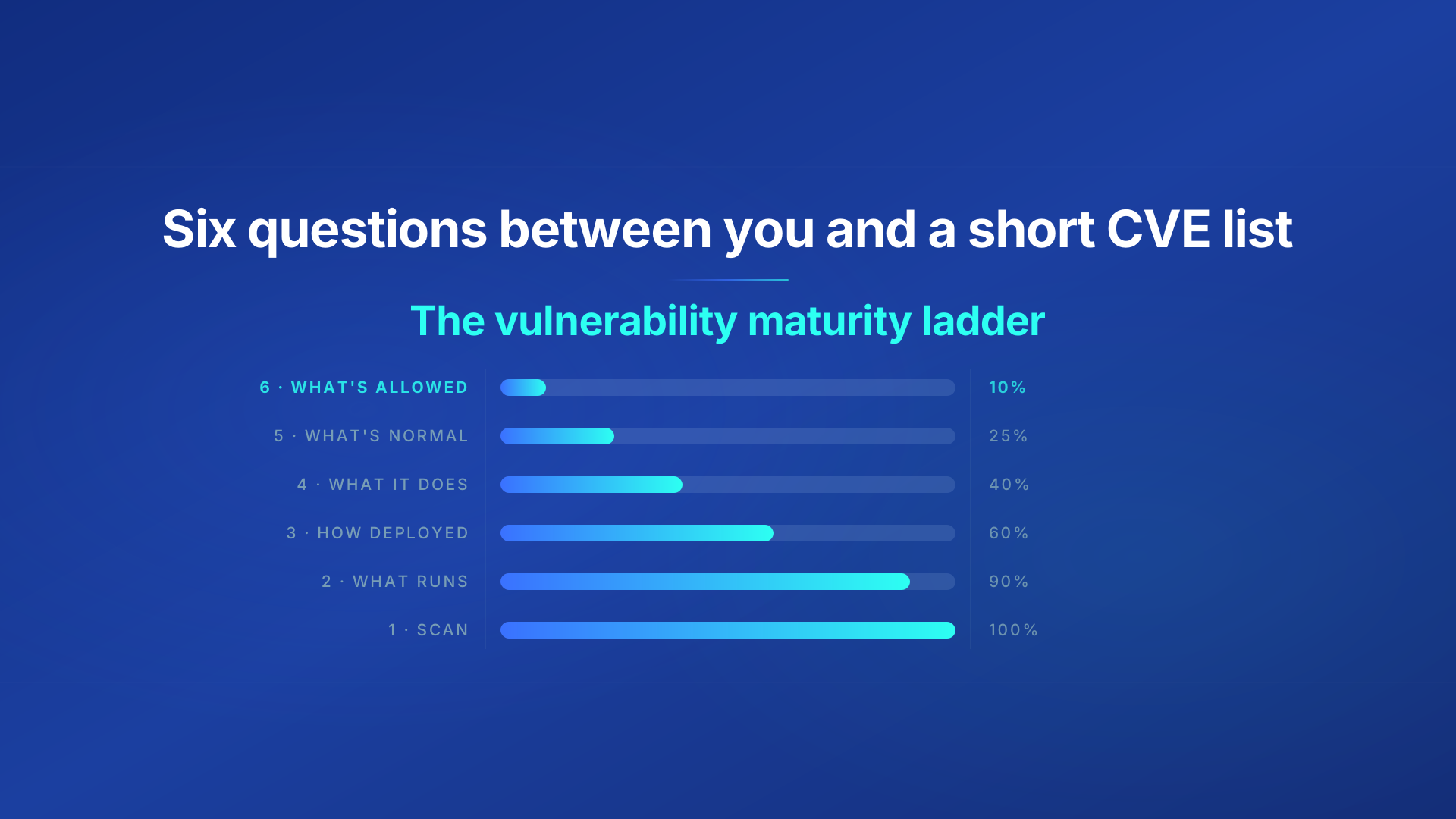
Most organisations scan their container images for CVEs. Most of them also have a CVE list that nobody can act on: thousands of findings, a handful of people, and no reliable way to say which ones matter.
The problem isn’t the scanning, it is how you handle it afterwards.
We’ve seen this pattern across years of conversations with customers and organisations of every size: platform teams, security teams, and the developers caught between them. The details differ, but the shape is the same. The same rungs, in the same order, with the same places where teams get stuck. This post lays out that ladder as we’ve come to understand it. Each rung is a question you can answer that you couldn’t answer on the rung below. The higher you climb, the shorter the list. And from the fifth rung upward, the same data that shortened the list starts protecting production from the CVEs not discovered yet.
It’s also why we built bifrost the way we did. Each rung maps to a clear step in the developer and platform workflow, so that when deploying bifrost, just minimal steps are required.
The ladder
| Rung | Question you can answer | CVE list remaining |
|---|---|---|
| 1 | Which CVEs does my software have? | 100% |
| 2 | What’s actually running, where? | 90% |
| 3 | How is it deployed? | 60% |
| 4 | What does it actually do? | 40% |
| 5 | What’s normal for it? | 25% |
| 6 | What’s allowed? | 10% |
Three phases: inventory (rungs 1–2), context (rungs 3–4) and runtime (rungs 5–6). Let’s take them in turn.
Inventory: what’s vulnerable, and what’s running
Rung 1: which CVEs does my software have?
You scan images at build time, or in the registry, or both. Findings go somewhere developers can see them (hopefully). Dependabot bumps minor versions. This is table stakes, and it’s where most organisations are.
The output is a complete list of every CVE in every image you’ve ever built. It’s accurate. It’s also useless as a work queue, because it has no relation to what’s exposed.
Rung 2: what’s actually running, where?
The next question is simple to state and surprisingly hard to answer: which image versions are in production right now, which are in staging, and which are in that cluster the data team runs?
An SBOM for every deployed container, in every environment, answers it. Scoping the CVE list to what’s deployed rather than what’s been built is the first cut: the images that were built and never shipped, or shipped and since replaced, leave the list. In the example above, that takes it to 90%. The bigger gain is relevance. Every CVE that remains is in something that’s running.
There’s a second benefit. A CVE published tomorrow can be matched against yesterday’s SBOMs without rebuilding a single image. Your list stays current between deploys, not just at them.
How bifrost helps: bifrost plugs into the pipeline you already have. Add a step to your CI/CD that generates an SBOM at build and hands it to bifrost alongside the deploy. Nothing changes for developers; the pipeline just produces one more artefact. We store every SBOM, rescan them periodically against new CVEs, and give you a list scoped to what’s actually deployed, per environment.
Context: cut the list by what can be reached
Here the list starts shrinking, and the reason it shrinks is reachability. A vulnerability that can’t be reached is a finding, not a risk.
Rung 3: how is it deployed?
Many CVEs need something to be exploitable: root, a specific capability, a writable host mount, a network path. A container that runs unprivileged with a read-only filesystem and no ingress can carry those CVEs and never be at risk from them.
Knowing how each container is deployed, meaning its privileges, capabilities, mounts and exposure, removes them from the list.
How bifrost helps: the bifrost agent reads deployment context for every container in the cluster and removes the CVEs that require a privilege or surface the container doesn’t have. In the example, the list goes from 90% to 60%.
Rung 4: what does it actually do?
The next cut comes from behaviour. A container image contains far more than the workload uses: package managers, shells, libraries pulled in by a base image nobody chose. If a binary never executes and a library never loads, its CVEs aren’t reachable either.
How bifrost helps: in observe mode, the agent watches what each container does at runtime, meaning the binaries it executes, the files it touches and the syscalls it makes, and gives the CVEs in packages and paths that never run the verdict never loaded. In the example, the list goes from 60% to 40%.
At rung 4, more than half the list is gone. No code has changed. No developer has been asked to do anything.
Runtime: the profile that cut the list now protects the workload
Rungs 5 and 6 don’t collect anything new. They take the behavioural data from rung 4 and turn it into something else: first a definition of normal, then a definition of allowed. Each definition cuts the list once more, and for a different reason.
Rung 5: what’s normal for it?
Runtime observation becomes a behavioural profile per production workload. The profile says what this container does: the binaries it executes, the files it reads and writes, the capabilities it uses, the connections it opens. Anything it does that the profile doesn’t cover is a deviation.
That definition of normal cuts the list again. Rung 4 removed the packages that never load. But a library that does load still needs a path to be exploited, and many of those paths are things the workload never does: a write to a directory it only reads, a binary it never executes, a socket it never opens, a capability it never uses. If the path to a CVE lies outside the profile, the CVE lies outside normal behaviour. It’s not something to patch tonight, because any attempt to use it would be a deviation, and deviations don’t go unnoticed.
This is where security operations enter the picture. Deviations are logged as signals and treated as potential incidents. A payment service that suddenly spawns a shell is not a CVE finding; it’s something to look at now.
How bifrost helps: in detect mode, the agent applies the profile and reports every deviation, with the pod, the image and the attempted action, without blocking anything. CVEs whose path lies outside the profile drop off the urgent list, and you get incident signals with no risk to the workload. In the example, the list goes from 40% to 25%. Detect is a stop on the way to enforce, not a place to stay: it’s how you check the profile against real traffic before you switch.
Rung 6: what’s allowed?
The final step is to enforce the profile. Default-deny: the container can do what the profile allows, and nothing else.
This does two things. It closes what rung 5 could only watch. Some CVEs sit in code the workload does exercise, so the vulnerable path is inside normal behaviour. What the exploit needs to do next usually isn’t: spawn a shell, write a payload, open a connection out. With the profile enforced, that next step is blocked at the kernel, and the CVE gets the verdict mitigated by the profile. In the example, that takes the list from 25% to 10%. And it contains what no scanner lists: the zero-day, the CVE that gets published next month, the vulnerability in the library nobody knew was there. The boundary doesn’t care whether the exploit has a number yet.
How bifrost helps: in enforce mode, the agent applies the profile as a default-deny AppArmor policy per container. Same profile as rung 5, one posture change. In the workload annotation, the three modes are audit, complain and enforce.
Where are you?
Six questions. Answer yes to move up.
- Do you scan every image for CVEs before it reaches the registry?
- Could you list, right now, which image versions are running in production, and check them against today’s CVEs?
- Do you know which of your containers run privileged, with host mounts, or exposed to the network?
- Could you say which binaries a given container actually executed last week?
- Would you notice if a production container started doing something it has never done before?
- Would it be stopped?
Most organisations stop at one. Every “no” after that is a rung, and every rung is a shorter list.
The first two rungs are yours to climb: scan, and know what you run. From rung 3, the bifrost agent does the climbing, reading context, observing behaviour, building the profile, and finally holding the line, so the list gets shorter and the workloads get safer without anyone rewriting a Dockerfile.
That’s the pathway we see working with the organisations we talk to: SBOMs from the pipeline you already have, an agent that starts by only watching, and one mode change at a time until the profile is enforced. Each step fits the workflow developers and platform teams already run. None of them requires a leap.
Tags
Do you know what's exploitable in your environment?
Deploy bifrost via Helm and it reads how every container is actually deployed, cutting your CVE list before a single line of code changes.